Feeds:
Posts
Comments

Source Control Overview book: http://www.ericsink.com/scm/source_control.html

Version control with subversion complete online book: http://svnbook.red-bean.com/

Using Tortoise SVN complete online book: http://tortoisesvn.net/support

Setting up and running Subversion and Tortoise SVN with Visual Studio and .NET: This quick tutorial will show how to start creating a repository and adding Visual studio Solutions and projects to it and then how to work with SVN:  http://www.west-wind.com/presentations/subversion/

Simple settings to add some Tortoise SVN tools as external tools and a toolbar to be used from within Visual studio: http://garrys-brain.blogspot.com/2007/07/tortoisesvn-and-visual-studio.html

An open source Visual studio plug-in for SVN : http://ankhsvn.open.collab.net/

Codeproject article about SVN and Tortoise SVN: http://www.codeproject.com/KB/books/Subversion_TortoiseSVN.aspx

http://openwebdesign.org/

http://www.opendesigns.org/

http://www.oswd.org/

Web design:

Common web usability problems: http://designreviver.com/tips/7-common-web-usability-problems/

9 Great UX presentations: http://komunitasweb.com/2009/03/9-great-ux-presentations-to-help-you-build-better-website/

Why consistency in web design is critical: http://www.sitepoint.com/article/why-consistency-is-critical/

Quick usability checklist: http://www.uxbooth.com/blog/quick-usability-checklist/

50 Free web image galleries: http://net.tutsplus.com/articles/web-roundups/50-excellent-image-galleries-you-can-use-today/

Homepage design: http://www.uxmatters.com/mt/archives/2007/08/home-page-design.php

Hotfix for asp:menu problems with IE 8 : http://weblogs.asp.net/bleroy/archive/2009/03/23/asp-menu-fix-for-ie8-problem-available.aspx

Office SharePoint Designer is now a free product: http://office.microsoft.com/search/redir.aspx?AssetID=XT103616701033&Origin=HH103607651033&CTT=5

Better tooltip with Jquery: http://net.tutsplus.com/tutorials/javascript-ajax/build-a-better-tooltip-with-jquery-awesomeness/#comments

Using Power point to design interactive UI prototypes: http://boxesandarrows.com/view/interactive

Using Flash to design interactive UI prototypes: http://www.boxesandarrows.com/view/quick-and-easy-flash

One of the most heated debates during Web sites or intranet designs are discussions were developers and designers discuss whether such a design or form or whatever is the best for the users.  In most of these discussions everyone is just assuming that what makes sense to himself/herself is what will make sense to users. In most of the times, actual users’ answer is “none of the above”.

For example, a 60 years old person who rarely uses a computer has serious trouble figuring out that hovering over a menu item will cause the menu to expand into the second level. For most designers or developers this is a no brainer. Same for floating panels or drag and drop operations and so on.

Most requirements documents mention actual users just in term of numbers; something like: expected number of users is X and expected number of concurrent users is Y and it is all about performance measures and not about knowing the actual users who will be using the system. Many developers and designers have never met the customers and can not even imagine how they look like or what they are actually using the machines. As a result, with unknown users, geeks are developing what they see best –for themselves.

Not understanding the end users is one sure way the application will not be a success. On the other hand, making really simple applications that targets the end users needs is one the reasons the IPod and the IPhone were smashing successes.

One the popular methodologies used to design a user-centric interface is the use of personas. Personas are imaginary users that are targeted during the design. There can be one or more personas for any given application. This is a good antidote for the problem of designing application for self rather than for the actual users (called mirror personas) For example, when designing Visual studio, Microsoft came up with three personas : Mort, the opportunistic developer, likes to create quick-working solutions for immediate problems and focuses on productivity and learn as needed. Elvis, the pragmatic programmer, likes to create long-lasting solutions addressing the problem domain, and learn while working on the solution. Einstein, the paranoid programmer, likes to create the most efficient solution to a given problem, and typically learn in advance before working on the solution.  (Reference: http://www.nikhilk.net/Personas.aspx )

The use of personas was introduced in the famous book “The inmates are running the asylum” ( http://www.amazon.com/Inmates-Are-Running-Asylum/dp/0672316498 )

Needless to mention, the success of this methodology depends on having personas that accurately represent the end users, otherwise it will be defeating the purpose.

This will help eliminate problems that are sure to come from discussions that go like this: For an application that is targeting people with very superficial knowledge of PCs:

  • Developer1 : How will the user be able to change that setting?
  • Developer2: Very simple, all they need to do is open this XML file and edit the corresponding node with the updated value.
  • Developer1: Cool, That means our application is generic and configurable.

Of course you can imagine the  users’ reaction when told to simply  open the XML file, look for the node “xyz”, etc. Even worse are the problems that may come out of such users actually trying to edit this XML file.

Personas can be equally helpful when trying to figure out what features may be most useful to “users” and what features can be scoped out of the project or how to prioritize features or releases.

References:

IE 8 Released

http://www.microsoft.com/windows/internet-explorer/default.aspx

This tutorial will very quickly walk through creating a VERY SIMPLE  Entity Model. This is a VERY simple tutorial to simply get a taste of EF.

You will need visual Studio 2008 SP1 or later and SQL Server for the database and we will use the Nrothwind sample database.
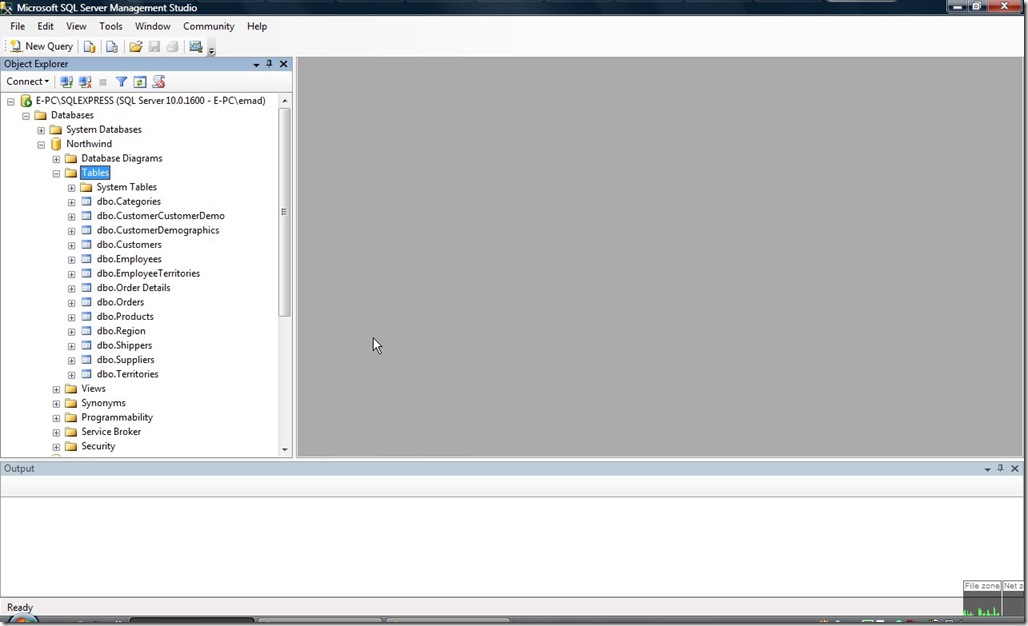
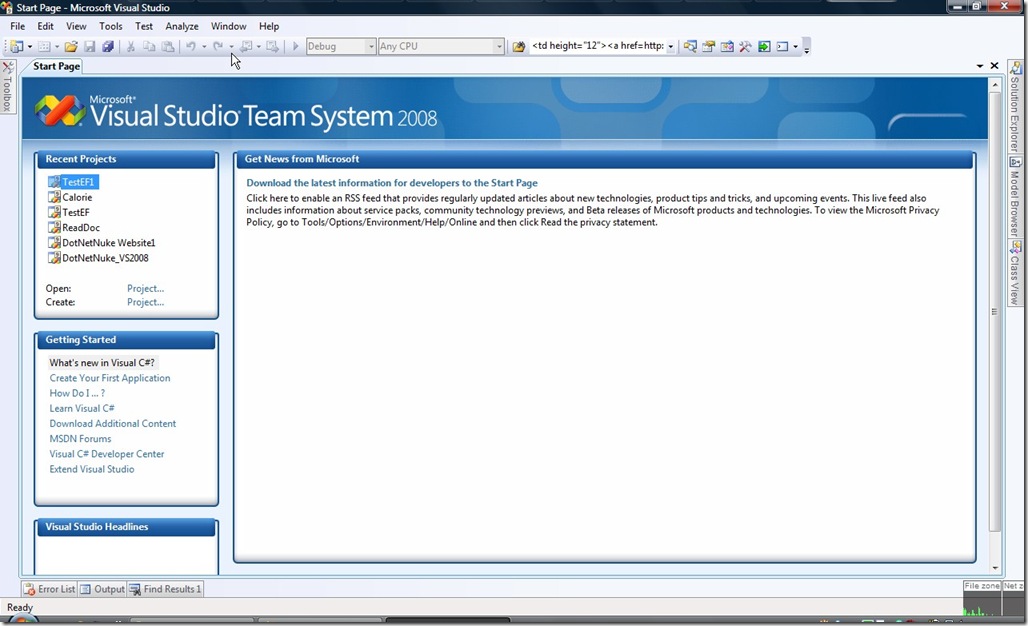
ScreenHunter_01 Mar. 19 00.09

Open Visual Studio 2008:

ScreenHunter_02 Mar. 19 00.09

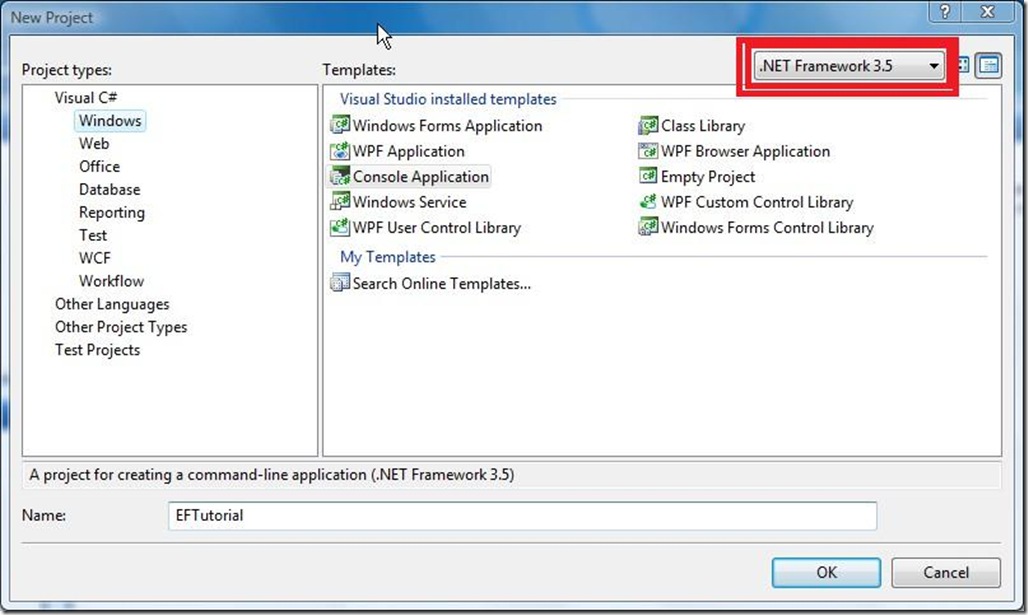
Create a new Project: (Make sure you are selecting Framework version 3.5)
ScreenHunter_03 Mar. 19 00.10

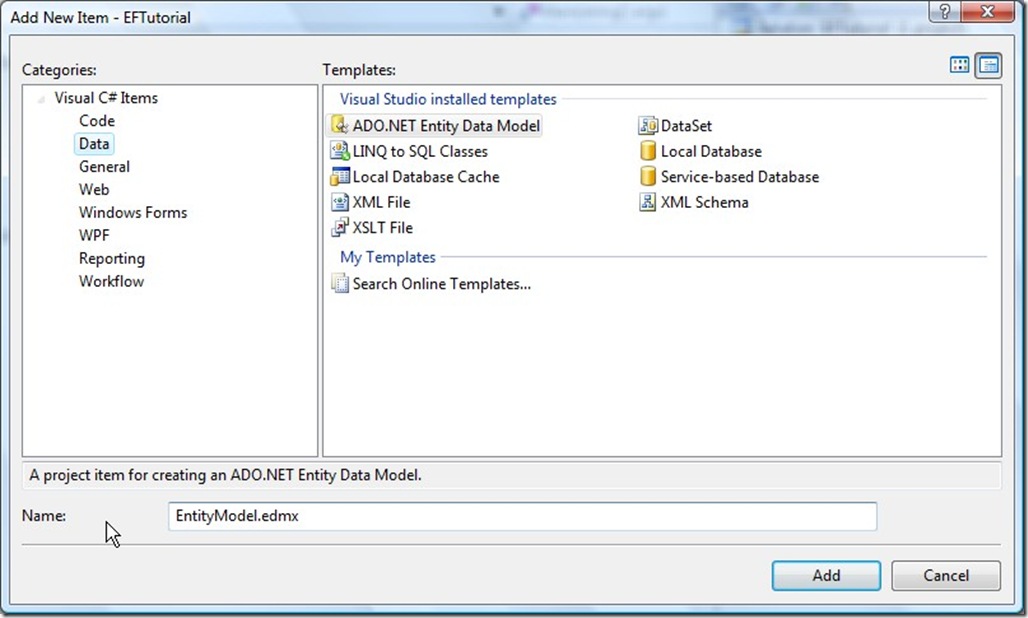
Right Click the Project Name and Select “Add Item”, Select ADO.NET Entity Data Model from the “Data” Category and select a name for it
ScreenHunter_05 Mar. 19 00.11

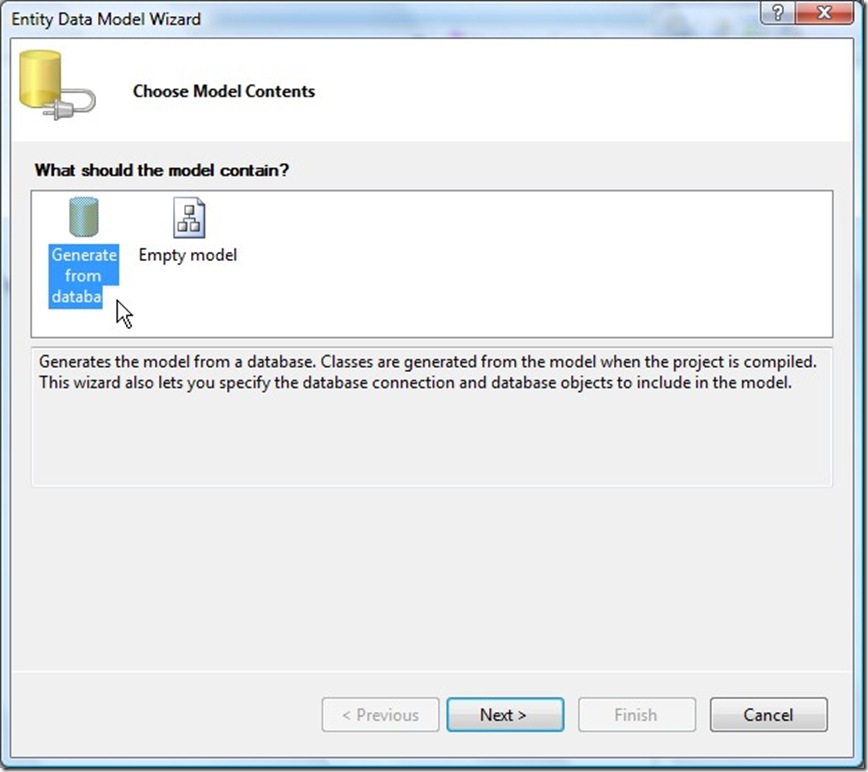
A Wizard will start, Please select “Generate from Database” (Note: Though theoretically, you can start with the Model and the Later on map it to the a database, The Visual studio tools for EF are best designed in this current release to generate the mode from the database.
ScreenHunter_06 Mar. 19 00.11

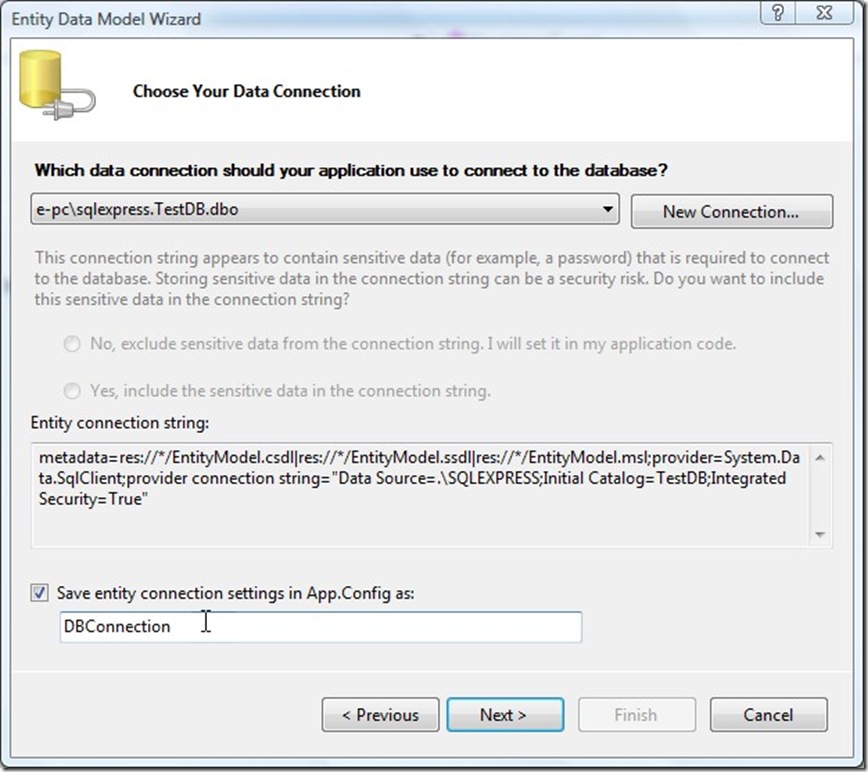
The Next form will ask you to create the connection to the database Or choose from an existing connection in the project if one exists:
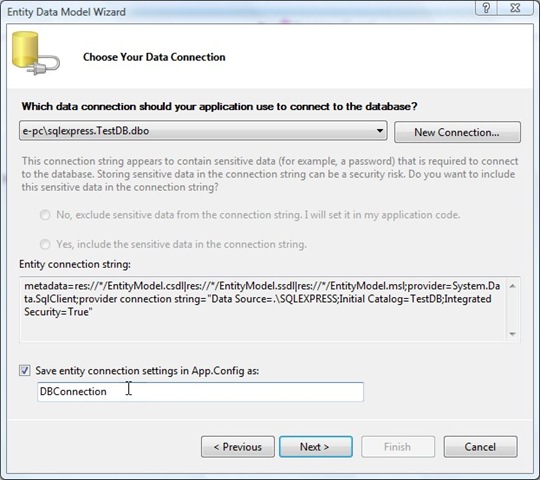
ScreenHunter_07 Mar. 19 00.11

Create the connection. Note that the wizard automatically creates a key in the web.config or app.config with the connection string inside it (nice feature)

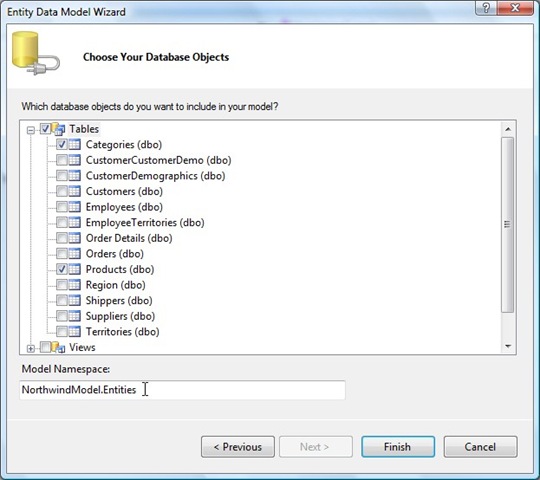
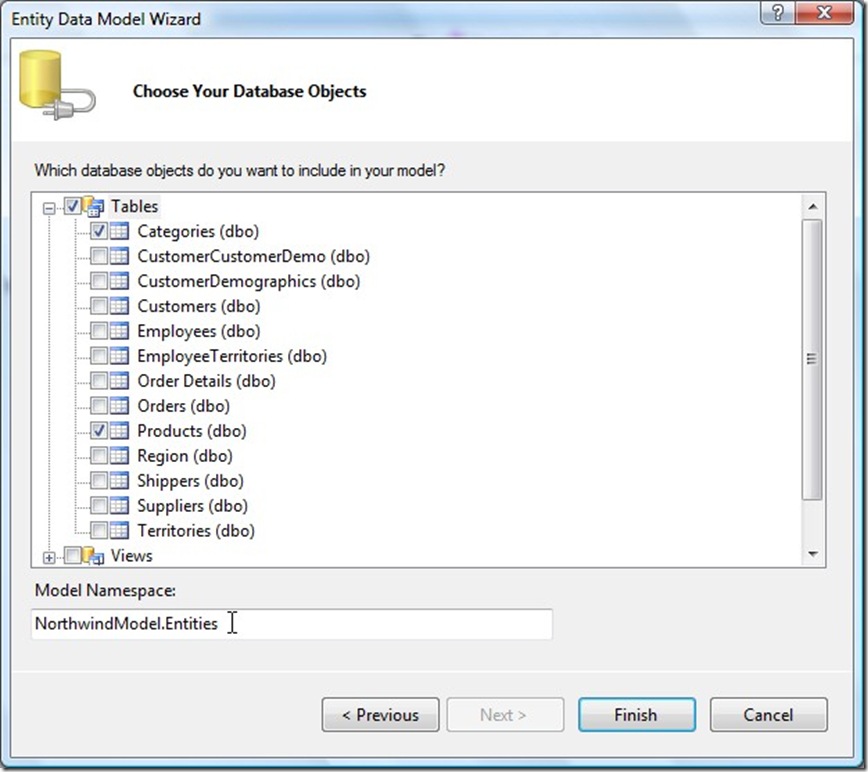
Next you will be asked To select the Tables/Views/Procedures that you want to include in the Entity Data Model and to se a namespace for the Model Classes:
ScreenHunter_09 Mar. 19 00.13

In Our case we will simply Select the “products” and “Categories” Tables from the List of tables available in the Northwind database. (This is just for simplicity).

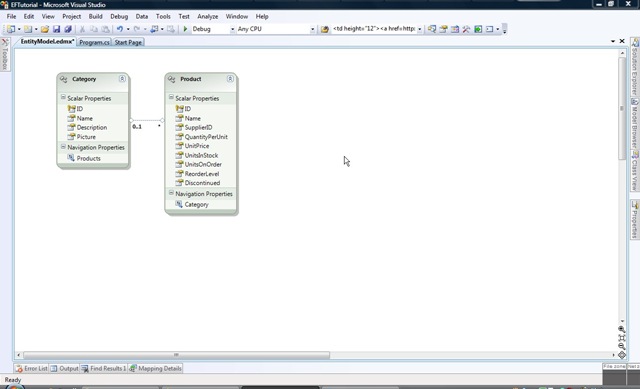
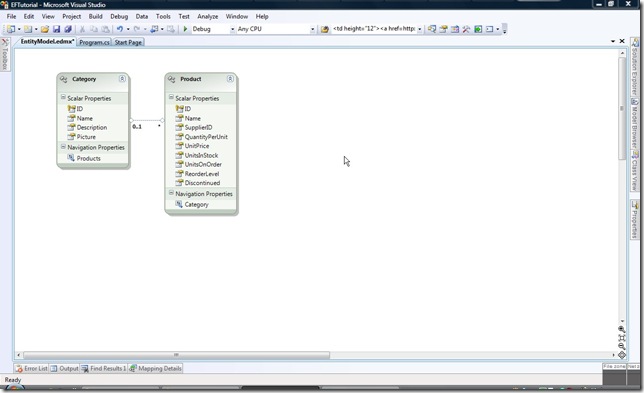
Based on the choice, the Wizard will generate the Entity data model.
ScreenHunter_10 Mar. 19 00.17

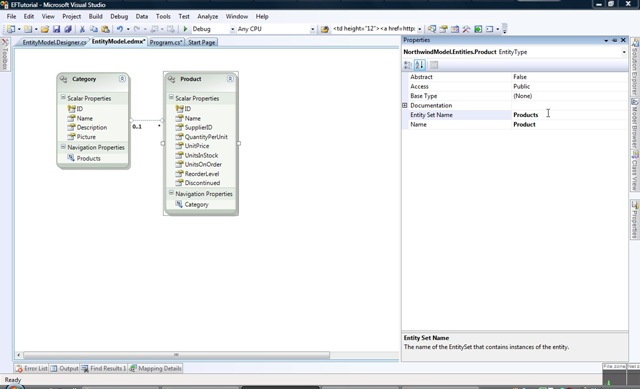
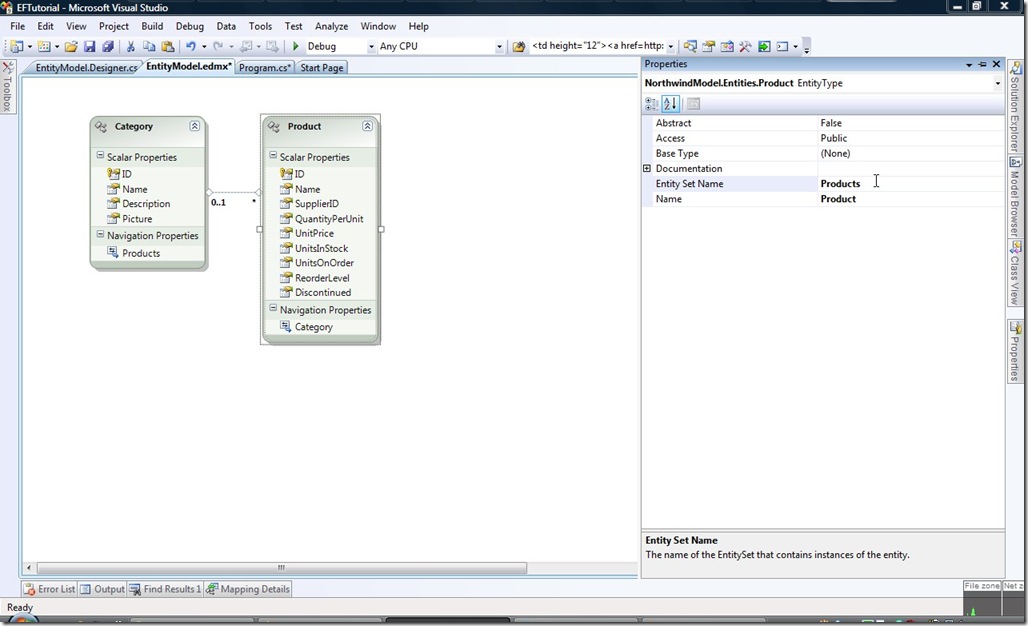
To make the Model more easy to understand and more natural, you can set the name for the Entity (Product as opposed to products like the table name in the database) and the Name of the Entity Set (we can make it Products or ProductSet or whatever)
ScreenHunter_11 Mar. 19 00.28

You can also change the Class properties, For example, you can rename ProductName (as in the column name in the DB) to be “Name” to be more natural to write code like productObj.Name rather than productObj.ProductName for example.


Now the model is ready we can start retrieving data.

A very simple code to load all products will look like this:

using (NorthwindDBConn context = new NorthwindDBConn())
{
    foreach (Product prod in context.Products)
    {
        Console.WriteLine(prod.Name);
    }
}

Important Note: Though prod Object has a category property, due to Lazy loading by the EF it will e initialized as null and wont be fetched from the database.

In order to read it from the database and make sure it is initialized, you need to add the line “ prod.CategoryReference.Load(); “ so the code will look like :


using (NorthwindDBConn context = new NorthwindDBConn())
{
    foreach (Product prod in context.Products)
    {
        prod.CategoryReference.Load();
        Console.WriteLine(prod.Name);
    }
}


That is All you need to retrieve elements from EF. To use more sophisticated queries, EF allows you to use LINQ to build queries.


In order to save an Product object for example, all you nee to do is:

using (NorthwindDBConn context = new NorthwindDBConn())
    {
        Product x = new Product();
        x.Name = "New Product";

        context.AddToProducts(x);

        context.SaveChanges();
    }


That is all you need to get started with the EF.

For more information you can refer to:
ASP.NET MVC 1.0 Released : http://www.microsoft.com/downloads/details.aspx?FamilyID=53289097-73ce-43bf-b6a6-35e00103cb4b&displaylang=en

A List of sample ASP.NET MVC applications: http://www.tampadev.org/News/Details/ASPNETMVCSampleApplicationsOpenSourceExamplesTutorials

A Free end-to-end chapter from an ASP.NET MVC book to be released in April 09: http://aspnetmvcbook.s3.amazonaws.com/aspnetmvc-nerdinner_v1.pdf

And the Sample application described in this chapter (full source code and unit tests): http://nerddinner.codeplex.com/

S# Architecture: ASP.NET MVC with NHibernate architecture: http://devlicio.us/blogs/billy_mccafferty/archive/2008/04/21/asp-net-mvc-best-practices-with-nhibernate-and-spring-net.aspx

Reshaper 4.5 Beta released and can be downloaded here: http://www.jetbrains.com/resharper/beta.html

Silverlight 3 Beta released (developer version only) : http://www.microsoft.com/downloads/details.aspx?FamilyId=11dc7151-dbd6-4e39-878f-5081863cbb5d&displaylang=en

ASP.NET MVC Training kit: http://www.microsoft.com/downloads/details.aspx?displaylang=en&FamilyID=1e0be0b2-910a-4676-9f3a-41e4d9c0fc08

Although SharePoint objects (SPSite, SPWeb, etc. ) are essentially managed code, they internally invoke unmanaged code (COM objects to handle database connections). As a direct result, if these objects are not explicitly disposed correctly, they will cause memory leaks that may eventually cause out of memory errors or make the application unstable. it is estimated that each un-disposed instance of SPSite or SPWeb consumes 1 to 2 MB of unmanaged resources.


A background about Memory Management:

In a 32 bit machine, the maximum amount of memory that a process can address is 2GB. This memory is partitioned into chunks of 64MB (on average, as this number slightly changes between the different versions of .NET Frameworks). Being in chunks, it means that a 3KB DLL will still occupy a 64MB slot.  For ASP.NET applications (including SharePoint), their memory ceiling is even lower than that 2GB since they live inside the w3wp process. The w3wp process loads some ISAPI DLLs and some IIS related DLLs in addition to the ASP.NET application. This explains why, for example, a server can throw out of memory exceptions while it has more than 5GB of free RAM. A good analogy can be found at (http://blogs.msdn.com/tess/archive/2006/09/06/net-memory-usage-a-restaurant-analogy.aspx)


Back to SharePoint, it means that all un-disposed objects are occupying memory within the 2GB w3wp and will eventually cause the application to crash, become unstable or starts throwing exceptions. Usually an application pool recycle or iisreset will be needed in order to get rid of these objects. Another major problem with un-disposed objects in SharePoint is that the unmanaged COM objects that are not disposed and that remain in memory are responsible for connecting to the back end database. By remaining un-disposed, the connection to the database remain open. Other that affecting performance, a machine can only have a certain number of connections open to the database (per machine overall , not per process). If the number of open connections remaining open reaches this limit, other processes that need to connect to the database will not be able to open new connections and will start to throw exceptions or behave strangely. This applies to 64 bits machines as well, even though memory might not be clogged, but connections will be clogged.


SharePoint v3.0 ULS Logging systems logs the SP objects that are not disposed at the end of the the thread. In order to pinpoint what code is causing such memory leaks, you need to:

  • Set the Logging level to Warning / Medium
  • create a registry key at HKEY_LOCAL_MACHINE\SOFTWARE\Microsoft\Shared Tools\Web Server Extensions\HeapSettings. Then create a new DWORD named SPRequestStackTrace with the value 1 under this key.

This will add the stack trace of the thread that is not disposing SP objects correctly to the logs, thus helping developers find out which part of the code is the problem. In the ULS logs, you will find something similar to: General                               8l1n       High       An SPRequest object was not disposed before the end of this thread.


Some general recommendations to avoid running out of memory:

  • Do not force more than one web application to use the same application pool. This will mean that more applications will be squeezed within the same 2GB that this process can address.
  • Do not run production code in debug mode. Running in debug mode means that each page’s code behind will be compiled into a separate DLL and therefore heavily fragmenting the memory. (use debug=false)
  • If possible, move to a 64bit architecture.


Some recommendations for building custom code for SharePoint (controls, web parts,  Event handlers, etc.)

  • First and foremost, Do not build your own controls unless you have to. Try first to customize out-of-the-box components.
  • If you have to use Code, check it with the SPDispose Check tool (http://code.msdn.microsoft.com/SPDisposeCheck) this tool will review the Code to help developers identify objects that are not correctly disposed.
  • Follow the best practices for using SP objects as Listed in http://msdn.microsoft.com/en-us/library/aa973248.aspx. This pretty much summarizes how to dispose SP objects correctly.
  • Common alternatives to explicitly calling Dispose() include using the SP object inside a try/catch/finally or using a “using” block. In fact the MSIL transforms using blocks to try/finally. Please note that you need a using block per object. for example, if you create SPSite then SPWeb, you need to call then like this

    using (SPSite siteCollection = new SPSite(“http://moss”))
    {
        using (SPWeb web = siteCollection.OpenWeb())
        {
              //…
        } // SPWeb object web.Dispose() automatically called
    }  // SPSite object siteCollection.Dispose() automatically called

  • Do NOT Dispose objects referenced from SPContext. These objects are managed by the SharePoint runtime and should not be disposed from your code. For example, do NOT dispose SPSite object you get through SPContext.Current.Site.
  • Same for references obtained through list handlers like SPListEventProperties.Web.
  • Do not nest the creation of SP objects in one line as it will become tricky when disposing them.  for example:
using (SPWeb web = new SPSite(http://shareoint).OpenWeb()) 
as in such case you wont have reference to the SPSite object in order to dispose it
  • When looping through Web.Webs for example, make sure to dispose every SPWeb created inside the loop.
  • Do NOT store SPSite or SPWeb objects in session or application variables. You can cache or Store the GUID, URL, whatever you can use to rebuild the SP object. You cannot cache the SP object itself.


References:

http://blogs.msdn.com/rogerla/archive/2009/01/14/try-finally-using-sharepoint-dispose.aspx 

http://blogs.msdn.com/rogerla/archive/2008/02/12/sharepoint-2007-and-wss-3-0-dispose-patterns-by-example.aspx

http://blogs.technet.com/stefan_gossner/archive/2007/11/26/dealing-with-memory-pressure-problems-in-moss-wss.aspx

http://blogs.msdn.com/steveshe/archive/2007/12/17/overlapped-recycling-and-sharepoint-why-sharepoint-requires-it.aspx

http://msdn.microsoft.com/en-us/library/aa973248.aspx

http://blogs.technet.com/stefan_gossner/archive/2008/12/05/disposing-spweb-and-spsite-objects.aspx

http://solutionizing.net/2008/12/06/the-new-definitive-spsitespweb-disposal-article/